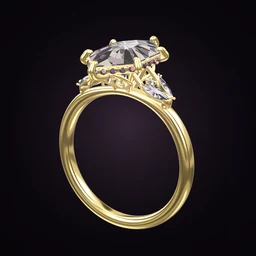
 Ring Studio
Ring designer
AI Ring Designer
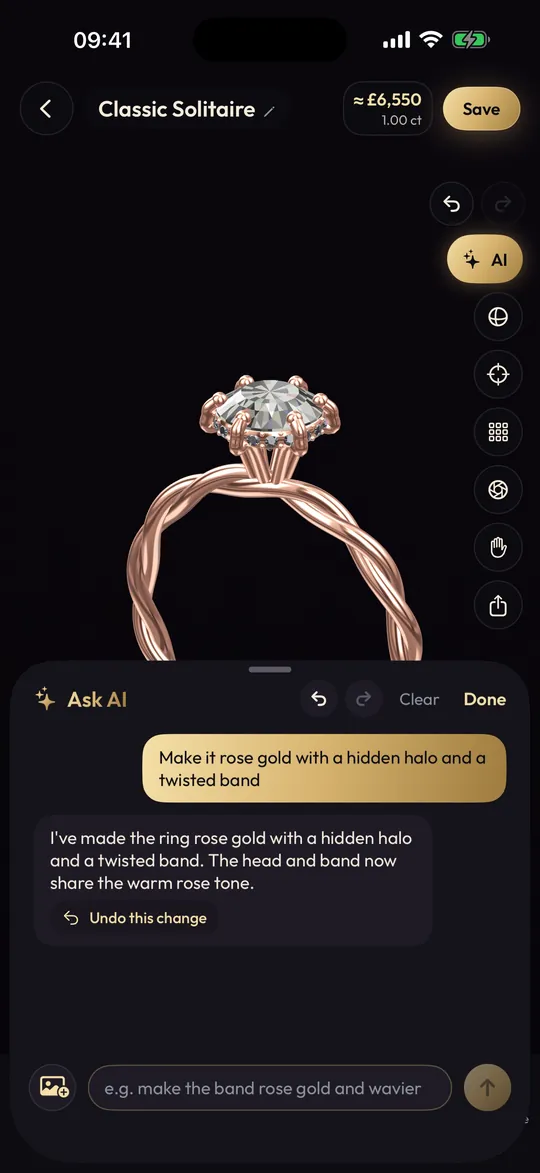
Ring Studio's AI ring designer turns a description like "oval diamond on a thin rose gold band with a hidden halo" into an editable 3D ring in seconds. You then refine it by chatting, or take over and edit any part by hand.
On this page
- Input
- Text description; photos and video with Pro
- Output
- An editable 3D ring, built in seconds
- Refine
- Chat ("make it rose gold") or edit by hand
- Free
- 3 AI text tries; unlimited with Pro
Why an AI ring designer builds a model, not a picture
There are two quite different things called "AI ring design". Image generators make a pretty picture of a ring. It may look great, but you can't turn it, the prongs may not hold anything, and a jeweller has to guess what's really going on.
Ring Studio's AI does something more practical. It reads your description and sets the actual design options of a 3D ring: the stone shape and carat, the setting and prong tips, halo, gallery, side stones, band and metal. The result is a ring built from real parts, so you can rotate it, edit it, and hand it to a jeweller knowing it describes something makeable.
How to write a prompt the AI will get right
You don't need jewellery vocabulary, but specific words help. Work through the ring from the top down:
| Part | Vague | Better |
|---|---|---|
| Stone | "a big diamond" | "a 1.5 carat oval lab diamond, set east-west" |
| Setting | "held securely" | "six claw prongs" or "a bezel setting" |
| Halo | "extra sparkle" | "a hidden halo" or "a classic halo" |
| Band | "delicate" | "a thin tapered pavé band" |
| Metal | "warm coloured" | "rose gold" or "yellow gold with a white gold head" |
Mood words work too. "Vintage", "art deco", "minimal" and "nature-inspired" all help steer the result towards matching options, such as an engraved vintage band or a slimmer, plainer setting. If a term is unfamiliar, our ring design glossary explains it.
Example prompts to try
- "Pear-shaped pink sapphire, rose gold, petite claw prongs, thin plain band."
- "Emerald cut diamond with baguette side stones in platinum, art deco feel."
- "Simple round solitaire, four prongs, yellow gold, knife edge band."
- "Elongated cushion with a hidden halo and a twisted band in white gold."
Refining by chatting
The first result is a starting point. Keep talking to it as you would to a jeweller across the counter:
- "Make the stone bigger."
- "Switch to rose gold."
- "Add a twisted band."
- "Use a tulip gallery instead."
- "Turn the stone east-west."
Each instruction changes the 3D ring in place. At any point you can stop chatting and tap into the manual designer to adjust a single detail, such as band width, yourself.
Step by step: your first AI ring in Ring Studio
- Open Ring Studio and start an AI design.
- Type your description, or with Pro, add a photo or video of a ring you like (see recreating a ring from a photo).
- Wait a few seconds while it builds the ring in 3D, then rotate it to check the side view.
- Refine by chat until the overall look is right.
- Fine-tune by hand: carat, band width, prong tip.
- Save the design and, if you like, compare it with a version made from scratch.
What the AI can't do
Being honest about limits saves frustration:
- It only uses Ring Studio's options. Ask for a tension setting, a cathedral, a split shank, a cluster or a toi et moi and it will build the nearest thing it can, not the real style. Our pages on split shank and toi et moi rings explain those styles to describe to a jeweller.
- No moissanite option. Ask for moissanite and you'll get a colourless diamond, which looks the same on screen. Compare the real stones in moissanite vs diamond.
- No karat or stone grading. "18k" or "VS1" won't change anything; those are decisions for your jeweller.
- It isn't a manufacturing file. There's no STL export. A jeweller rebuilds the design in CAD.
Prompt ideas by ring style
If you're browsing rather than describing a ring you already have in mind, start from a style and let the AI fill in the details:
- Vintage: "old European cut diamond, six prongs, engraved yellow gold band". See vintage engagement rings.
- Art deco: "asscher cut in platinum with baguette side stones". See art deco rings.
- Minimal: "small round diamond in a bezel on a very thin plain band". See minimalist rings.
- Colourful: "oval blue sapphire with a classic halo in white gold".
Then compare the AI's version with one you build by hand. Often the best design takes the AI's idea and your own adjustments.
Who the AI ring designer suits
It's ideal if you know the feeling you want but not the terminology, if you're browsing for ideas (try "something unusual with a coloured stone" and see what comes back), or if you want to turn a vague brief from a partner into something concrete. If you already know exactly which options you want, the manual 3D ring designer may be just as quick. For inspiration, our unique engagement rings and engagement ring trends guides are good prompt fuel.
Frequently asked questions
How does an AI ring designer work?
You describe the ring in everyday words. The AI interprets the description and sets the ring's real design options, such as stone shape, setting, halo, band and metal, so you get a 3D ring you can rotate and edit rather than a flat picture.
Is the AI ring designer free?
Ring Studio includes 3 free AI text tries. Ring Studio Pro unlocks unlimited AI design from text, photos and video.
Can the AI design a ring from a picture?
Yes, with Pro. Show it a photo or video of a ring and it recreates the design in 3D for you to edit.
Is an AI-designed ring something a jeweller can make?
Yes, because the AI builds the ring from the same real ring parts the manual designer uses, rather than inventing impossible shapes. A jeweller still recreates it in their CAD software to make it.
Why doesn't the AI build exactly what I typed?
It can only use the options Ring Studio has. If you ask for something without a dedicated option, such as a tension or split shank setting, it will build the closest version, which you can then adjust or describe to your jeweller.