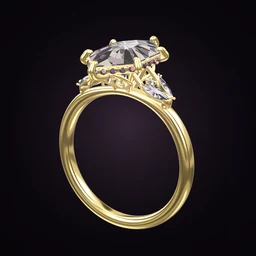
 Ring Studio
Ring designer
3D Ring Designer
Ring Studio is a 3D ring designer for your phone: you build the ring in real time, spin it in your fingers and change any part of it, from the centre stone down to the gallery under it. It's free to download on iPhone, iPad and Android.
On this page
- What it is
- A real-time 3D ring editor for engagement rings and wedding bands
- Platforms
- iPhone, iPad and Android, free to download
- Stone shapes
- 28 (12 free, all 28 with Pro)
- Metals
- Yellow, white and rose gold, platinum, two-tone
- Output
- A design you can screenshot or share as a ring code; not a manufacturing file
What a 3D ring designer shows you that photos can't
Most ring shopping happens through flat images shot from above at the most flattering angle. That hides the things people only discover once the ring is on their finger: how tall the setting stands, whether the band thins out under the stone, whether a wedding band will sit against it, and what the stone looks like from the side.
A 3D ring designer fixes that by letting you treat the ring as an object. In Ring Studio you drag to rotate it, pinch to zoom and tap a part to change it. Every change redraws instantly, so you can compare a 4-prong and a 6-prong setting, or a plain and a pavé band, in the same view within seconds.
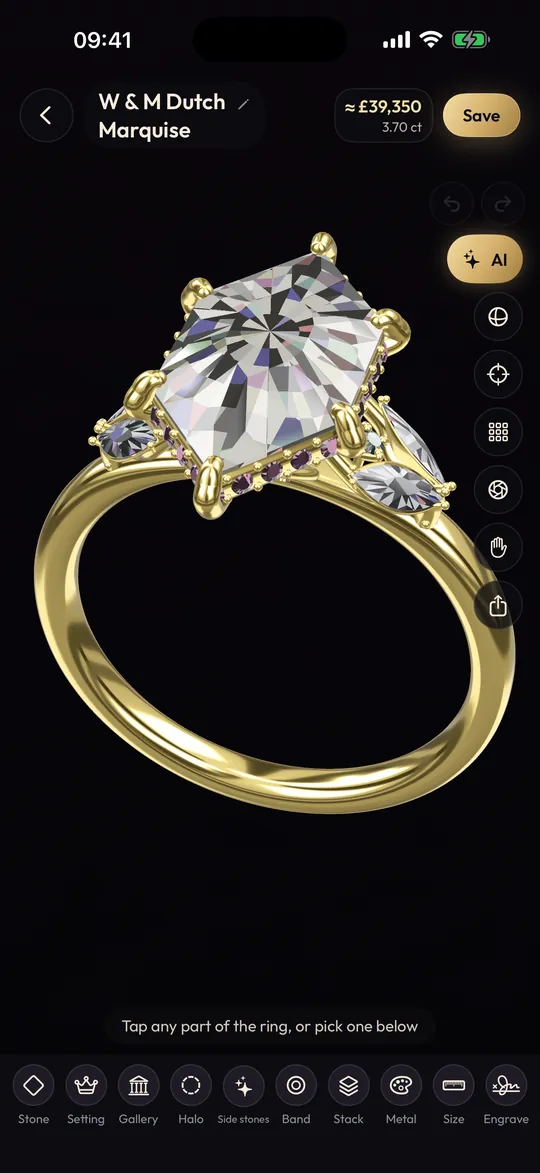
Every part of the ring you can edit in 3D
If you're new to ring vocabulary, the parts of a ring guide explains each term. Here is how those parts map to what you can change in the app.
| Part | Options in Ring Studio | What to look at in 3D |
|---|---|---|
| Centre stone | 28 shapes, adjustable carat, north-south or east-west | Outline from above and how far it spreads across the finger |
| Stone type | Natural or lab-grown diamond, yellow or black diamond, blue or pink sapphire, emerald, ruby, morganite | Colour against your chosen metal |
| Setting | 4, 5, 6 or 8 prong, bezel, lotus, compass; round, claw, double or petite prong tips | How much metal covers the stone at the corners |
| Halo | None, hidden halo, classic halo | Face-up size versus side sparkle |
| Gallery | Open, rail, tulip, flame | The side profile, the part most photos miss |
| Side stones | Three stone, pears, marquise, leaf V, baguettes, kites | Balance between centre and sides |
| Band | Plain, pavé, eternity, knife edge, twisted, bypass, asymmetric, engraved; straight or tapered; adjustable width | Width at the back versus the shoulders |
| Metal | Yellow, white, rose gold, platinum, two-tone | Warmth of the metal against the stone |
How to design a ring in 3D with Ring Studio
- Pick a centre stone shape. Start with the outline you like most. If you're torn, build two versions and flip between them; our oval vs round comparison explains why they look so different on the hand.
- Set the carat and orientation. Slide the carat up and down and watch the stone grow. Try an elongated shape east-west for a modern twist (see east-west rings).
- Choose the setting and prong tips. Rotate to the corners of the stone. Claw and petite tips look lighter; double prongs look more secure.
- Turn the ring on its side. This is the step people skip. Choose the gallery (open, rail, tulip or flame) and add a hidden halo if you want a flash of sparkle from the side. Our gallery styles guide shows what each one does.
- Shape the band. Pick plain or pavé, straight or tapered, then set the width. A tapered band makes the centre stone look larger.
- Try each metal. Toggle between gold colours and platinum with the stone in view.
- Save and compare. Designs are saved on your device, so you can build a few and decide later.
Tip: before you settle on a design, look at it from three angles: straight down, from the side at finger level, and from the end of the finger. If it still looks right from all three, you've got a design that will look right in real life.
Shortcuts if you don't want to start from scratch
A blank canvas can be daunting. Ring Studio has a few ways in. Describe the ring in plain words and the AI ring designer builds it in 3D in seconds, then you refine it by chatting or by hand. If you have a picture of a ring you love, you can recreate it from a photo. And if you have no idea where to start, Surprise me and the style quiz throw up ideas to react to. Three AI text tries are free; unlimited AI, including photos and video, comes with Pro.
What the 3D designer can't do
It's worth being clear about the limits, so you know what to expect.
- It isn't manufacturing CAD. There's no STL or 3DM export, so you can't send the file straight to a printer or caster. A jeweller rebuilds your design in their own CAD software. Our Ring Studio vs jewellery CAD page explains the difference.
- Some styles don't have a dedicated option yet, including tension, cathedral, split shank and cluster settings. You can get close (a rail gallery and tapered band, for instance) and describe the rest to your jeweller.
- Screen sizes aren't real sizes. The 3D view shows proportions. To judge real-world size, use the carat size chart or the try-on feature with Pro.
- No karat choice. You pick the metal colour; whether it's 9k, 14k or 18k is a conversation with your jeweller. See gold karats explained.
From 3D design to a real ring
Once you're happy, take screenshots from the top and side, or share a ring code (Pro) so a jeweller with the app can open the exact design. A good bench jeweller or custom studio will model it in CAD, show you a render, often print a resin model to try on, then cast and set it. Our guide to how custom rings are made walks through each stage, and custom engagement ring costs covers what to budget.
Verdict
A 3D ring designer is the fastest way to find out what you actually like before you spend anything. Ring Studio lets you see every angle of the ring and change any part in seconds; a jeweller then turns that design into metal.
Frequently asked questions
Can I design a ring in 3D for free?
Yes. Ring Studio is free to download and the core 3D designer is free, with 12 stone shapes, the main settings and bands and all metals except two-tone. Ring Studio Pro adds the AI tools, try-on and the more advanced options.
Why design a ring in 3D rather than looking at photos?
Photos show a ring from one flattering angle. In 3D you can turn the ring to see the side profile, how high the stone sits, what the gallery looks like and how the band tapers, which are the details that decide how a ring feels to wear.
Can I 3D print a ring from Ring Studio?
No. Ring Studio is a design and visualisation tool and does not export STL or 3DM files. A jeweller recreates your design in their own CAD software to print a wax or resin model and cast it.
Does a 3D ring designer show the real size of the stone?
Ring Studio scales the stone with the carat you choose, so you can see how a bigger or smaller stone changes the look. For exact millimetre sizes by carat, check a carat size chart, because real stones of the same weight vary with cut proportions.
Is a 3D ring design the same as a jeweller's CAD render?
Not quite. A jeweller's CAD file is a precise manufacturing model with exact wall thicknesses and prong sizes. A Ring Studio design shows the look and proportions you want, and the jeweller turns it into a production model.
Keep reading
 Stone shapesOval Engagement Rings: How to Choose a Beautiful OneOval engagement ring guide: the best length-to-width ratio, judging the bow-tie, carat-to-mm sizes, flattering settings …