 Ring Studio
Ring designer
Wedding Ring Stack Designer
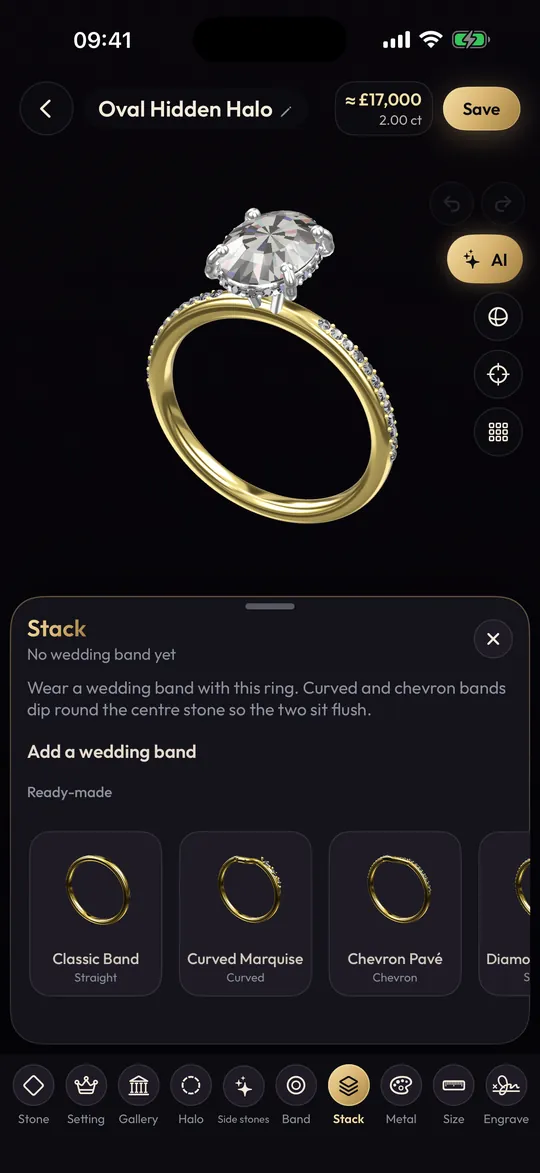
Ring Studio's wedding ring stack designer lets you put your engagement ring and one or more bands together in 3D, above or below, and shape each band straight, curved or chevron so the whole stack sits flush.
On this page
- Stack, set or sandwich: three ways to wear wedding rings together
- How to design a wedding ring stack in Ring Studio
- Matching the band contour to the stone shape
- Stack design tips
- Stack ideas by engagement ring style
- Getting the stack's sizes right
- What the stack designer can't do
- Getting a contoured band made
- Stack
- Engagement ring plus bands above and/or below
- Contours
- Straight, curved, chevron
- Band styles
- Plain, pavé, eternity, knife edge, twisted and more
- Plan
- Ring Studio Pro
Stack, set or sandwich: three ways to wear wedding rings together
| Arrangement | How it's worn | Design priority |
|---|---|---|
| Classic pair | One band below the engagement ring | The band must clear the setting and match the width |
| Sandwich | A band above and below the engagement ring | Both bands shaped to the stone; often identical |
| Growing stack | Bands added over the years for anniversaries or births | Each new band must work with what's already there |
A bridal set is the classic pair sold as one, designed together. Designing your own stack gets you the same "made to fit" result with free choice of each piece. For visual ideas, see ring stacking ideas.
How to design a wedding ring stack in Ring Studio
- Start with the engagement ring. Open your design, build it, or recreate the ring you already wear from a photo or description.
- Add a band below. Pick a style and width. Start with the same width as the engagement ring's band.
- Turn to the side view. Look for the gap. If the halo, bezel or gallery stops the band from touching, change the contour.
- Choose the contour. Curved for round, oval and cushion stones and halos; chevron for pear, marquise and other pointed shapes; straight if the setting sits high enough to clear the band.
- Add a band above for a sandwich, mirroring the lower band or contrasting with it.
- Play with metals. All one metal reads as a set; a yellow engagement ring between two white bands is a deliberate mixed stack.
- Try the stack on with the camera to check that it doesn't overwhelm your finger.
Matching the band contour to the stone shape
| Engagement ring | Usually sits flush with |
|---|---|
| High-set solitaire, open gallery | Straight band |
| Round, oval or cushion with a classic halo | Curved band |
| Low bezel set stone | Curved band |
| Pear, marquise, Dutch marquise, kite | Chevron band |
| East-west elongated stone | Curved or straight, depending on setting height |
This is a starting point; settings vary, so always check the side view. More detail in curved and contour bands and chevron wedding bands.
Stack design tips
- Balance sparkle. If the engagement ring has a pavé band and halo, a plain band beside it stops the stack looking busy. If the engagement ring is a plain solitaire, a pavé or eternity band adds sparkle.
- Watch the total width. Three 2.5 mm rings make a 7.5 mm stack, wider than many men's bands. Comfortable for some, restrictive for others.
- Plan for later bands. If you might add an anniversary band, leave room: a contoured band designed now can be mirrored later.
- Consider wear. Rings rubbing together wear each other over the years, especially different hardness metals. Matching metals wear more evenly.
Stack ideas by engagement ring style
- Classic solitaire: a thin pavé band below for sparkle, or a matching plain band for a minimal pair. See solitaire rings.
- Halo: a curved pavé band that hugs the halo, often mirrored above for a sandwich. More on halo rings.
- Pear or marquise: a chevron band below; with a pear, try the point facing up and the chevron echoing it.
- Three stone: a straight plain band, so the side stones stay the focus. See three stone rings.
- Bezel: a curved band, as bezels usually sit low; a knife edge band adds definition without stones.
Getting the stack's sizes right
Stacked rings are usually made in the same size, but a wide stack feels tighter than a single ring, and some people go up a quarter or half size for the band. If you plan to wear the engagement ring alone sometimes, size it to sit comfortably on its own. Use the hand scan (Pro) as a starting point and confirm with a jeweller; our ring too big or too small guide covers fixes like sizing beads.
What the stack designer can't do
Ring Studio stacks bands with an engagement ring, but it doesn't yet have dedicated options for soldered sets, interlocking "enhancer" wraps or split shank engagement rings. A jeweller can make those from your stack design. As with every design in the app, there's no STL export; the jeweller recreates each band in CAD.
Getting a contoured band made
A curved or chevron band is shaped to one specific ring, so take the engagement ring with you. Share screenshots of the stack from the top and side, or a ring code so the jeweller opens it in Ring Studio. Ask whether they'll scan or measure your ring to match the curve. Budgets are covered in wedding ring costs, and the etiquette of which ring goes where in which hand an engagement ring goes on.
Frequently asked questions
How do I design a wedding ring stack?
Start with the engagement ring, add a band below it (the traditional position), check the side view for gaps, then curve or chevron the band if needed. Add a second band above if you want a fuller stack.
Which goes first, the engagement ring or wedding ring?
Traditionally the wedding band goes on first, closest to the heart, with the engagement ring on top. Many people wear it the other way round or sandwich the engagement ring between two bands.
How many rings can you stack?
Two or three is common: engagement ring plus one or two bands. Comfort is the limit; a tall stack can restrict bending your finger.
Should I buy a bridal set or design the stack myself?
A bridal set is designed to fit together out of the box. Designing your own stack lets you pick each piece, including bands added later for anniversaries, as long as each is shaped to fit.
Is the stack designer free?
Wedding band stacks and band curve are part of Ring Studio Pro. You can design a single band for free.